Running a Local LLM on an Old Phone
How I turned a retired Huawei nova 7i into a full AI edge server — local LLM inference, API gateway, Telegram bot reports, and monitoring dashboard — all at zero cost.
Why Reuse an Old Phone?
Most old phones end up in a drawer or a landfill. But they're actually capable hardware — ARM64 CPUs, multiple cores, built-in battery backup, WiFi, and zero recurring cost. My Huawei nova 7i was collecting dust after I upgraded, so I decided to give it a second life as an always-on AI edge server.
No cloud bills. No new hardware. Just a phone, a USB cable for power, and Termux.
The Device
The Huawei nova 7i is a mid-range phone from 2020 with a Kirin 810 chipset — 8 cores (2x Cortex-A76 + 6x Cortex-A55), 8 GB of RAM, 128 GB storage, running Android 10. The ARM64 architecture means it can compile and run llama.cpp natively.
Architecture
The full pipeline runs entirely on the phone. Termux provides a Linux environment, llama-server handles LLM inference, PicoClaw acts as the API gateway, a Telegram bot sends me reports 4 times a day via cron, a Node.js dashboard monitors everything, and Cloudflare Tunnel exposes it all to the public web.
How I Set It Up
1. Install Termux
First, I installed Termux from F-Droid (the Play Store version is outdated) along with Termux:API for accessing battery and sensor data from the command line.
pkg update && pkg upgrade
pkg install termux-api
2. Build llama.cpp & Download Model
llama.cpp compiles natively on ARM64. I built it from source, then downloaded a quantized Qwen 2.5 1.5B (Q4_K_M) GGUF model — small enough to fit in memory but surprisingly capable for an edge device.
pkg install cmake golang git
git clone https://github.com/ggml-org/llama.cpp
cd llama.cpp && cmake -B build
cmake --build build --config Release -j4
3. Configure PicoClaw AI Gateway
PicoClaw sits in front of llama-server as an API gateway — routing requests, managing rate limits, and providing an OpenAI-compatible endpoint. This is what the Telegram bot and dashboard talk to.
npm install -g picoclaw
picoclaw init --backend llama --port 3000
4. Set Up the Telegram Bot + Cron Job
This is one of my favourite parts. PicoClaw connects to a Telegram bot (NN Mobile Brain) that sends me AI-generated reports 4 times a day — morning briefing, mid-day pulse, afternoon update, and evening market wrap. Each message includes gold prices, news, productivity tips, task suggestions, and insights. A cron job in Termux triggers it every 6 hours.
pkg install cronie termux-services
sv-enable crond
crontab -e
# Run every 6 hours (4x/day)
0 */6 * * * node ~/picoclaw/telegram-report.js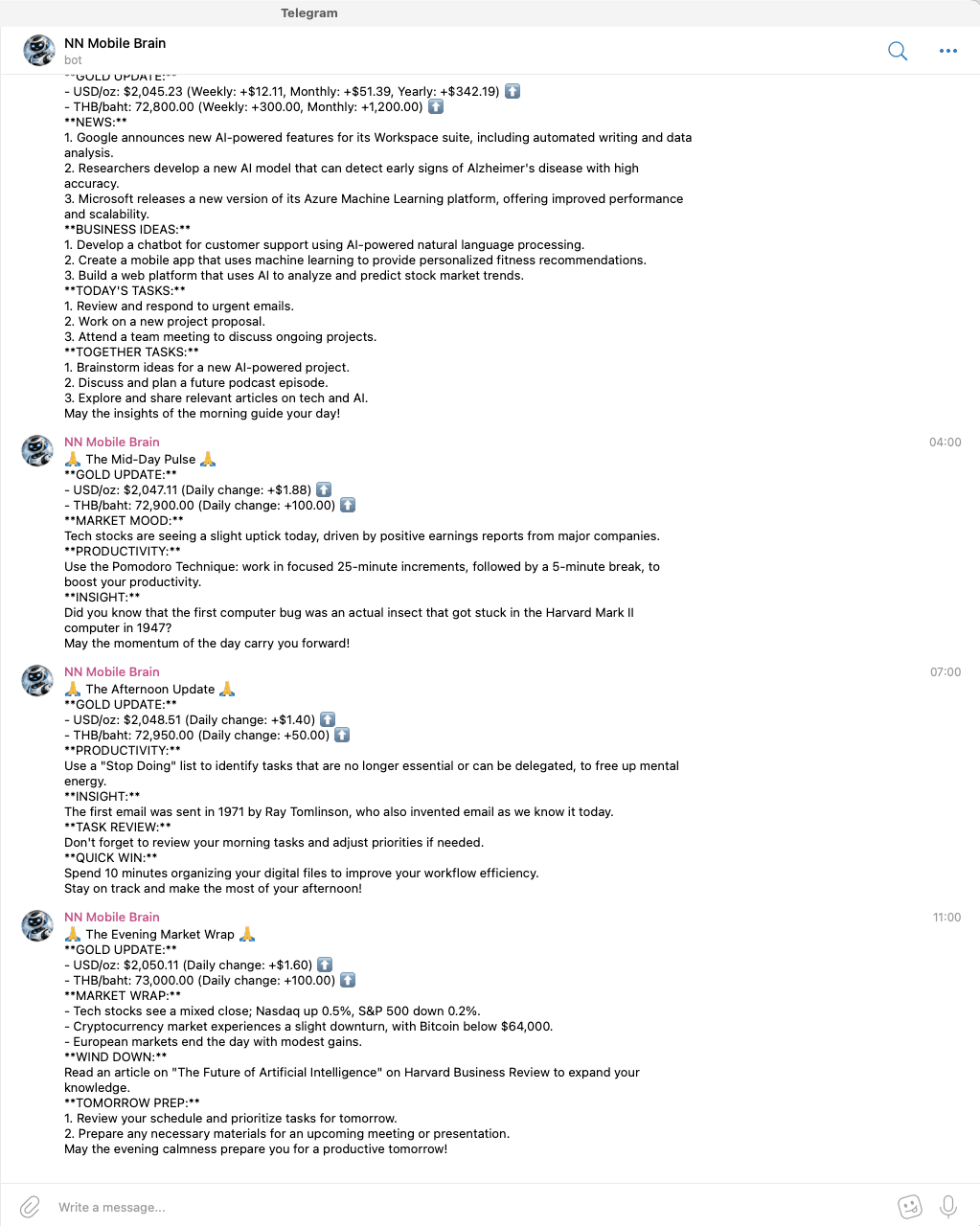
5. Build the Monitoring Dashboard
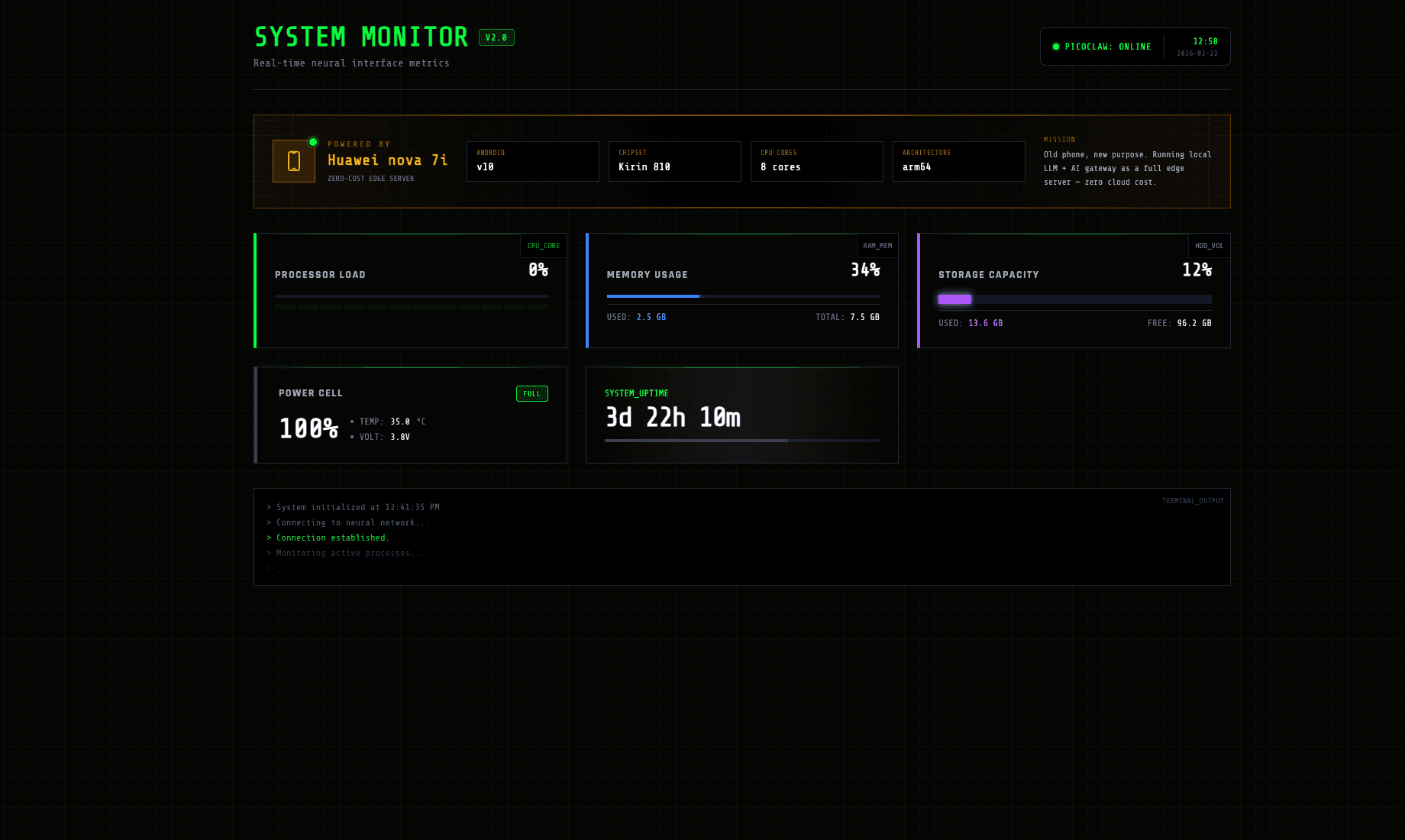
A Node.js server running on the phone collects system metrics via Termux:API (CPU, RAM, battery temp/voltage, storage, uptime) and serves a cyberpunk-styled dashboard built with Alpine.js. It shows real-time stats and a terminal output log.
6. Expose via Cloudflare Tunnel
The final piece: making everything publicly accessible. Cloudflare Tunnel creates a secure connection from the phone to the internet without port forwarding or a static IP. One command and it's live.
pkg install cloudflared
cloudflared tunnel --url http://localhost:3000
Results
The server has been running 24/7 with zero downtime. During inference, CPU usage sits around 35%, the model uses ~2.1 GB of RAM, and the battery stays at 100% (always plugged in). The Telegram bot delivers reports like clockwork — 4 times a day — and the dashboard is accessible from anywhere through the Cloudflare tunnel.
All of this on a phone that was going to sit in a drawer forever. Zero cloud cost, zero new hardware — just a bit of tinkering and a good use case.
Stack
Learn More
Want to build something similar? Here are the resources I used.
The API gateway that sits in front of your local LLM and provides an OpenAI-compatible endpoint.
Run large language models on commodity hardware. Compiles natively on ARM64 / Android via Termux.
Official guide to creating Telegram bots. Use BotFather to generate a token and start sending messages.
Everything about running a Linux environment on Android — package management, APIs, cron jobs, and more.
Expose local services to the internet securely without port forwarding or a public IP.
Browse and download quantized GGUF models for local inference.